OBD JScan
Clever SoftwareAuto & Vehicles
4.7602.00 Reviews
- Version
- v03.07.2026.10:45
- Installs
- 100.00K
- Age Rating
- Everyone
Screenshots
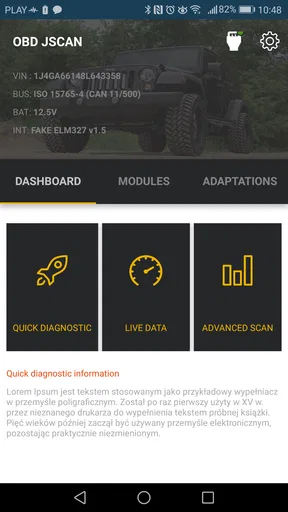
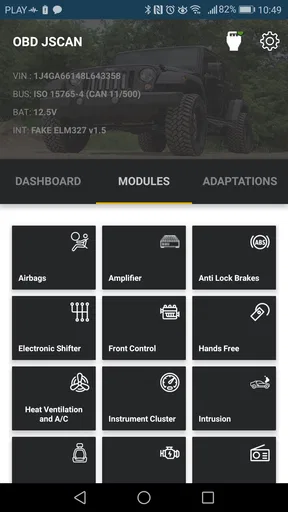
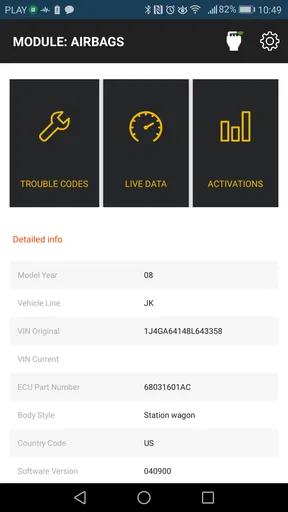
Our Review of OBD JScan
 Analysis by Appyee
I find the lasting value of a vehicle app is less about the first impressive screen and more about whether it helps me make a better decision months later. OBD JScan is aimed at Jeep, Chrysler, and Dodge owners who want to look beyond a dashboard warning and inspect what their vehicle is reporting. Its appeal is strongest when you already enjoy hands-on troubleshooting; it is less compelling if you only want a quick, universal explanation for a warning light.
Useful when a warning becomes a real question
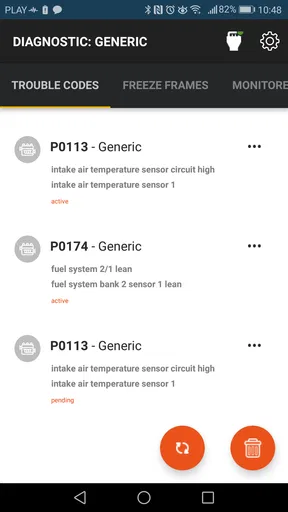
A practical reason to keep a diagnostic app around is that problems rarely arrive at a convenient time. If a warning appears before a commute, I would rather record what the vehicle is reporting and compare it with how it feels than guess based on the light alone. Reading a code can help me describe the issue more clearly to a repair shop, while live readings may give useful context when a symptom comes and goes.
That does not mean a phone can tell me with certainty what part needs replacing. A fault code is a clue, not a complete diagnosis, and a reading that looks unusual needs interpretation alongside the vehicle’s behavior. I would use the app to narrow down questions, not treat it as permission to ignore a serious warning or skip a qualified inspection.
What to consider before connecting
The app works with a compatible Bluetooth adapter connected to the vehicle’s OBD-II port, so there is a small setup decision before the first scan. I would check adapter compatibility and the supported functions for my particular vehicle before paying to unlock anything. That matters because an adapter that connects is not automatically a guarantee that every module or customization will be available.
A careful first session is more useful than tapping through menus at random. I would start by identifying the vehicle in the app, establish the connection while parked, and read information before attempting any changes. If I plan to test a setting, I would note the original state first. That simple habit makes it easier to reverse a change and avoids turning a diagnostic session into a guessing game.
Where it fits among diagnostic choices
Compared with a basic code reader, OBD JScan can be a deeper option for supported Jeep, Chrysler, and Dodge vehicles: it combines code reading with live information, output tests, and some vehicle-specific customization. A basic reader may be the better buy for someone who only wants to check an engine code occasionally, especially if that person prefers a dedicated handheld device and has no interest in exploring additional data.
A repair shop still has the advantage when a problem requires professional equipment, experience, or physical inspection. I see the app as a useful middle ground for an owner who wants more visibility before deciding what to do next, rather than a replacement for a mechanic. Its vehicle focus is also important: if your car is outside the supported makes or the feature you need is unavailable for its model, a more general diagnostic option may suit you better.
First Impressions of the OBD JScan App
When I first opened OBD JScan, I was greeted by a clean and straightforward interface. This is something I appreciate right off the bat because, let's face it, no one wants to deal with a cluttered app when they're trying to figure out why their check engine light is on. The app is available for both Android and iOS, making it easily accessible no matter what device you're using.
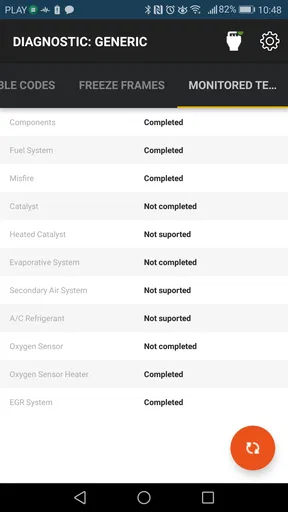
Once you're in, the app prompts you to connect to your car's OBD-II port via a compatible Bluetooth adapter. This was a breeze, and within minutes, I was pulling up all sorts of data on my car. From engine diagnostics to real-time sensor readings, it’s amazing how much information is at your fingertips.
Diving into the Features
The feature set of OBD JScan is nothing short of impressive. It offers a wide array of diagnostics that can be a lifesaver for DIY enthusiasts and professional mechanics alike. You can read and clear trouble codes, view live data, perform output tests, and even customize certain features of your vehicle if supported.
One of my favorite features is the ability to view live sensor data. This is incredibly useful when trying to diagnose issues that don’t always trigger a fault code. The app displays this data in an easy-to-read format, allowing you to monitor everything from fuel consumption to throttle position in real-time.
"The live data feature is like having a mechanic in your pocket."
Customization and Advanced Features
For those who love to tweak and customize, OBD JScan doesn’t disappoint. Some vehicles allow you to enable or disable features like seatbelt chimes, DRL settings, and more. It’s like having a secret menu for your car. However, keep in mind that not all features are available for every vehicle, so your mileage may vary.
Another standout feature is the app's ability to conduct output tests. This lets you test various components in your vehicle, such as activating the fuel pump or testing the cooling fan. It's a handy tool for diagnosing issues without getting your hands dirty.
Keeping it useful beyond the first scan
After the novelty of exploring menus wears off, the app’s recurring value depends on whether I have a reason to return. For an owner who maintains a vehicle over time, checking a recurring symptom, reviewing live readings during troubleshooting, or confirming that a warning has cleared can make occasional access worthwhile. If the car rarely needs attention and I never change settings, I may not open it often—and that is a reasonable outcome, not a failure.
For a realistic example, imagine a familiar warning appearing just before a weekend drive. I would park safely, connect the adapter, note the code rather than immediately clearing it, and consider whether the vehicle is behaving differently. If the warning returns or the symptoms seem serious, I would stop treating the app as the answer and arrange proper diagnosis. Keeping the code information gives me a more useful starting point when I explain the issue.
Small habits that prevent avoidable frustration
The most important maintenance burden is not constant app upkeep; it is being deliberate about the diagnostic process. I would keep the adapter details handy, avoid testing vehicle functions while driving, and save or write down useful readings before clearing a code. Clearing a warning too soon can remove a helpful clue, while changing several settings at once makes it harder to know which change mattered.
Output tests deserve extra care. Activating a component is not the same as proving that the whole system is healthy, and a test can be confusing if I do not know what response to expect. I would use those controls only when parked and when I understand the purpose of the test. For anything safety-critical, or anything that could affect how the vehicle operates, I would leave the change alone until I had reliable guidance.
The purchase model is another part of the routine to consider. The app is free to download, but in-app purchases range from $0.99 to $169.99 per item, so I would identify the exact capability I need before spending. Clever Software develops the app, and its vehicle-specific focus is a reason to check supported functions carefully rather than assume that a feature demonstrated for one Jeep, Chrysler, or Dodge applies to another.
User Experience and Performance
The app's performance is smooth, and I didn’t encounter any significant lags or crashes during testing. The UI is intuitive, and even if you’re not particularly tech-savvy, navigating through the app is a breeze. The developers have done a great job at making a potentially complex app accessible to the average user.
One thing to note is that while the app itself is free to download, unlocking specific features or modules often requires in-app purchases. This is a common practice, but it’s something to keep in mind if you're on a tight budget.
Who is likely to keep it installed?
I think the best fit is a Jeep, Chrysler, or Dodge owner who likes to understand what the car is reporting and is willing to learn the difference between a clue and a diagnosis. It may also suit a hands-on mechanic who wants an extra way to inspect supported vehicle information. Someone who only wants a simple, occasional engine-code lookup may be happier with a basic reader, while a driver who prefers not to interpret technical readings should go straight to a trusted repair professional.
There are also good reasons to skip it. If you do not own a compatible vehicle, do not have a suitable adapter, or only want a general maintenance reminder app, this is the wrong kind of tool. And if you are uncomfortable making vehicle settings changes, you can still use the diagnostic side, but the customization menu is not a reason to buy it. The value comes from matching the app’s capabilities to a specific need, not from using every option.
How the app earns its place over time
OBD JScan is free to download, rated for Everyone, and has a 4.8 average from around 2.9 thousand ratings, with over 100 thousand installs. It first appeared on May 24, 2018, and its current version is v24.02.2026.22:45, with Android 5.0 as the minimum requirement. Those details make it easy to see why it attracts owners looking for a phone-based tool, but the more important question for me is whether I would reach for it again after the first scan.
For an owner who handles small checks personally, the answer can be yes: the combination of trouble codes, live sensor readings, output tests, and supported customizations gives several distinct reasons to return. For someone who expects a one-tap fix or wants every vehicle function explained without background knowledge, the app can feel more demanding than helpful. The 582 reviews reflect a substantial body of user feedback, but my own decision would still hinge on the vehicle and the particular task.
Conclusion: Is OBD JScan Worth It?
In a word, yes. Whether you're a casual car owner looking to save some money on diagnostic fees or a dedicated gearhead wanting to dive deeper into your vehicle's performance, OBD JScan is a fantastic tool. It's user-friendly, packed with features, and offers a lot of value for its price.
So, if you're ready to turn your smartphone into a powerful diagnostic tool, give OBD JScan a try. It might just become your new favorite app.
My long-term verdict is more measured: this is worth keeping when its vehicle-specific diagnostics answer questions I actually have, and when I am comfortable using an adapter and interpreting the results responsibly. It is not a substitute for maintenance, a repair manual, or a mechanic, but it can make the first step in troubleshooting more informed. If that kind of occasional, hands-on usefulness fits the way you care for your vehicle, it earns its space; if not, a simpler reader or professional diagnosis is the better choice.
Verdict
Strengths of OBD JScan
- Easy-to-use interface for beginners.
- Comprehensive vehicle diagnostics.
- Supports a wide range of vehicles.
- Regular updates with new features.
- Affordable compared to competitors.
Limitations of OBD JScan
- Limited advanced features for experts.
- Requires external OBD adapter.
- Occasional connectivity issues.
- In-app purchases can add up.
- No offline mode available.
Similar Picks in This Category
View All
Android Auto
Google LLC4.1

maxim — order a taxi & food
PT. SITO4.7

Штрафы ГИБДД: проверка с фото
Pays LLC – Штрафы ГИБДД4.7

Номерограм – проверка авто
Авто Ассист4.8

Дром Авто
Дром4.9

Frequently Asked Questions
What is OBD JScan used for?
OBD JScan is a diagnostic app designed for car enthusiasts and mechanics, allowing users to access and interpret data from their vehicle's onboard diagnostic system. It provides real-time insights into engine performance, fault codes, and various sensor readings, helping users diagnose issues and maintain optimal vehicle performance.
Is OBD JScan compatible with all vehicles?
OBD JScan is compatible with most vehicles equipped with an OBD-II port, typically found in cars manufactured after 1996. However, to ensure full functionality and compatibility, it's recommended to check the app's official website or documentation, as certain features may vary depending on the vehicle make and model.
What features does OBD JScan offer?
OBD JScan offers a range of features including reading and clearing diagnostic trouble codes, monitoring live data, performing emissions tests, and accessing ABS and SRS systems. The app also supports advanced features like ECU coding and adaptation, making it a comprehensive tool for vehicle diagnostics and maintenance.
Do I need additional hardware to use OBD JScan?
Yes, to use OBD JScan, you will need an OBD-II adapter that connects to your vehicle's diagnostic port. The adapter communicates with the app via Bluetooth or Wi-Fi. It's important to choose a compatible adapter, as recommended by the app developers, to ensure seamless connectivity and accurate data retrieval.
Is OBD JScan user-friendly for beginners?
OBD JScan is designed to be user-friendly, with an intuitive interface that simplifies complex diagnostic processes. While it offers advanced features for experienced users, beginners can easily navigate through the app to perform basic diagnostics and understand vehicle health. Tutorials and guides are often available to assist new users.
